Nieuwste add-ons
Synchroniseer en bewerk de datum die is toegevoegd
Deze MediaMonkey-add-on werkt de 'DateAdded'-waarde voor alle nummers in een album bij op basis van de datum waarop het album voor het eerst werd afgespeeld.
Versie
Huidige versie: 1.2.0
Functies
Opent een dialoogvenster om de doelwaarde te controleren en aan te passen voordat deze wordt opgeslagen.
gebruikt de datum waarop het album voor het eerst werd afgespeeld als begin- en maximumwaarde voor afgespeelde albums
Ondersteunt niet-afgespeelde albums door de huidige datum en tijd als toegestane bovengrens te gebruiken.
Biedt een knop om de huidige datum en tijd in te stellen voor niet-afgespeelde albums.
Opent met een compacte of brede lay-out, afhankelijk van de gewenste breedte van de inhoud.
Schrijft de datum waarop alle nummers in het album zijn toegevoegd naar de database en activeert vervolgens de MediaMonkey-tagsynchronisatie.
verwerkt alleen het eerste album in een gemengde selectie en toont een melding.
Gedrag
Als het eerst geselecteerde nummer geen album bevat, wordt de actie geannuleerd.
Voor afgespeelde albums opent de editor met de eerste afspeeldatum vooraf geselecteerd.
Voor albums die nog niet zijn afgespeeld, opent de editor met de huidige waarde van DateAdded of met de huidige datum en tijd.
Ongeldige waarden, zoals toekomstige datums of waarden buiten de toegestane limiet, worden geblokkeerd.
Menu-item
De menuoptie is beschikbaar onder 'Labels bewerken'.
Sync&Edit DateAdded
Hide original
This MediaMonkey addon updates DateAdded for all tracks in an album based on the album's first play date.
Version
Current version: 1.2.0
Features
opens a dialog to review and adjust the target value before saving
uses the album's first play date as the initial and maximum value for played albums
supports unplayed albums by using the current date and time as the allowed upper limit
provides a button to set the current date and time for unplayed albums
opens with compact or wide layout depending on required content width
writes DateAdded for all tracks in the album to the database and then triggers MediaMonkey tag syncing
processes only the first album in a mixed multi-selection and shows a notice
Behavior
if the first selected track has no album, the action is canceled
for played albums, the editor opens with the first play date preselected
for unplayed albums, the editor opens with the current DateAdded value or the current date and time
invalid values such as future dates or values after the allowed limit are blocked
Menu Entry
The menu entry is available under Edit Tags.
By
AI (inspired by Fetzenschaedl)
Ingezonden door fetzenschaedl
Bijgewerkt 25/03/2026
Versiegeschiedenis / Details
- Versie:
- 1.2
- Bijgewerkt:
- 25/03/2026
- Size:
- 8.08 KB
- Werkt met:
- Media Monkey 2024

MatchMonkey is een veelzijdige en krachtige MediaMonkey 5-add-on die is ontworpen om je ervaring met het ontdekken van muziek en het maken van afspeellijsten te verbeteren. Het integreert meerdere zoekmodi, waaronder zoeken op artiest, nummer, genre, stemming en activiteit, en maakt gebruik van de last.fm API en ReccoBeats.com om muziek te vinden die vergelijkbaar is met je bibliotheek of die is afgestemd op je stemming en activiteiten.
Met intelligente multi-pass fuzzy matching identificeert MatchMonkey nauwkeurig nummers in je lokale bibliotheek, waardoor kwalitatief hoogwaardige matches gegarandeerd zijn. Geavanceerde filter-, populariteits- en randomisatieopties stellen je in staat om afspeellijsten aan te passen aan je voorkeuren. De add-on ondersteunt flexibel afspeellijstbeheer, zoals het maken van nieuwe afspeellijsten, het overschrijven van bestaande afspeellijsten of het direct toevoegen van nummers aan 'Nu afspelen'.
MatchMonkey beschikt ook over een automatische wachtrijmodus voor naadloze, eindeloze weergave door automatisch vergelijkbare nummers toe te voegen wanneer je afspeellijst bijna is afgelopen. Prestatieoptimalisaties en caching zorgen voor een soepele werking zonder onderbrekingen tijdens het luisteren.
MatchMonkey is ideaal voor gebruikers die op zoek zijn naar dynamische, gepersonaliseerde muziekontdekking en continue weergave binnen MediaMonkey 5. Het combineert krachtige API's en slimme algoritmen voor een moeiteloze en boeiende luisterervaring.
Voor ondersteuning en updates kunt u terecht op de GitHub-repository. Overweeg ook om het project te steunen via Ko-fi.
Belangrijkste kenmerken
- Slimme ontdekking : Zoek op Last.fm of ReccoBeats naar vergelijkbare artiesten, nummers, genres of akoestische stijlen op basis van geselecteerde nummers of de muziek die momenteel wordt afgespeeld.
- Afspeellijsten maken : Geavanceerde opties voor het maken van afspeellijsten of wachtrijen voor 'Nu afspelen'.
- Intelligente matching : Geavanceerde multi-pass fuzzy matching vindt nummers in uw lokale bibliotheek met hoge nauwkeurigheid.
- Flexibele uitvoer : maak nieuwe afspeellijsten aan, overschrijf bestaande afspeellijsten of voeg nummers direct toe aan 'Nu afspelen'.
- Automatische wachtrijmodus : Eindeloze muziek door automatisch vergelijkbare nummers in de wachtrij te plaatsen wanneer je afspeellijst bijna is afgelopen.
- Rangschikkingssysteem : Geef prioriteit aan populaire nummers op basis van de populariteitsranglijst van Last.fm.
- Randomisatie : Optioneel de resultaten door elkaar schudden voor gevarieerde luisterervaringen.
- Lijst met gemiste aanbevelingen : ontvang een lijst met aanbevelingen die u niet in uw plaatselijke bibliotheek heeft.
Updates: https://github.com/remo-imparato/MatchMonkey/releases
MatchMonkey is a versatile and powerful MediaMonkey 5 add-on designed to enhance your music discovery and playlist creation experience. It integrates multiple discovery modes—including artist, track, genre, mood, and activity-based searches—leveraging the last.fm API and ReccoBeats.com to find music similar to your library or tailored to your mood and activities.
With intelligent multi-pass fuzzy matching, MatchMonkey accurately identifies tracks in your local library, ensuring high-quality matches. Advanced filtering, ranking by popularity, and randomization options allow you to customize playlists to your preferences. The add-on supports flexible playlist management, including creating new playlists, overwriting existing ones, or directly queuing tracks to Now Playing.
MatchMonkey also features an auto-queue mode for seamless, endless playback by automatically adding similar tracks as your playlist nears its end. Performance optimizations and caching ensure smooth operation without interrupting your listening.
Ideal for users seeking dynamic, personalized music exploration and continuous playback within MediaMonkey 5, MatchMonkey combines powerful APIs and smart algorithms to deliver an effortless and engaging listening experience.
For support and updates, visit the GitHub repository and consider supporting the project on Ko-fi.
Key Features
Hide original
- Smart Discovery: Query Last.fm or ReccoBeats for similar artists, tracks, genre, or acoustics based on selected tracks or currently playing music
- Playlist Creation: Advanced options for creating playlists or enques to Now Playing
- Intelligent Matching: Advanced multi-pass fuzzy matching finds tracks in your local library with high accuracy
- Flexible Output: Create new playlists, overwrite existing ones, or queue tracks directly to Now Playing
- Auto-Queue Mode: Endless music by automatically queueing similar tracks when approaching the end of your playlist
- Ranking System: Prioritize popular tracks using Last.fm's popularity rankings
- Randomization: Optionally shuffle results for varied listening experiences
- Missed Recommendation List: Get a listing of the recommendations that you do not have in your local library
Updates: https://github.com/remo-imparato/MatchMonkey/releases
By
rimparato
Ingezonden door rimparato
Bijgewerkt 01/04/2026
Versiegeschiedenis / Details
- Versie:
- 2.2.6
- Bijgewerkt:
- 01/04/2026
- Licentie:
- Dual MIT/Commercial
- Werkt met:
- Media Monkey 5.0.0
- Wijzigingen:
MatchMonkey v2.2.6 - What's New
? Better Shuffle, Smarter Matching, Cleaner Settings
This update improves randomization, gives you more control over recommendation quality, and makes sure your settings actually work as expected!
What's Improved:
? NEW: Control Recommendation Quality
• API Match Threshold - Set the minimum similarity score (0-99%) for recommendations
• Works with both Last.fm and ReccoBeats.com
• Higher values = only get highly similar recommendations
• Lower values = discover more variety (but less similar tracks)
• Default is 40% - adjust to your taste!
• Recommendations below your threshold are automatically filtered out
• See exactly how many were filtered in the results summary
✨ Smarter Shuffle Algorithm
• Playlists now feel more random - no more tracks grouped by artist/album
• When including seed tracks with shuffle enabled, everything mixes together properly
? Helpful Feedback
• After each run, see exactly what happened:
• How many tracks were added
• Which recommendations weren't in your library
• What was filtered out by your API threshold
• What was skipped due to rating filters
⚙️ Settings That Actually Work
• Fixed issue where your configured limits were being overridden by hidden defaults
• Your settings now control the add-on's behavior exactly as shown
? Cleaner Options Panel
• Removed confusing settings that weren't working
• Unhid the "Exclude artists" filter (it was hidden but working!)
• Temporarily hidden "Local collection" field until MediaMonkey 5 supports it
---
Bottom line: Fine-tune recommendation quality with the API match threshold, enjoy better shuffled playlists, and get clear feedback about what MatchMonkey found (or filtered out) in your library. ?
- Versie:
- 2.2.5
- Bijgewerkt:
- 15/03/2026
- Size:
- 206.8 KB
- Licentie:
- Dual MIT/Commercial
- Werkt met:
- Media Monkey 5.0.0
- Wijzigingen:
Better Playlist name generation to show the seed criteria used
Improved Reccobeats.com usage where each individual track is used for similar music, not an averaged accusitics profile.
- Versie:
- 2.2.2
- Bijgewerkt:
- 13/02/2026
- Size:
- 203.83 KB
- Licentie:
- Dual MIT/Commercial
- Werkt met:
- Media Monkey 5.0.0
- Wijzigingen:
- ? **Smart Discovery**: Query Last.fm for similar artists or similar tracks based on selected or currently-playing music
- ? **Mood & Activity Playlists**: Use ReccoBeats audio profiles for moods/activities—best results are obtained when seed tracks are relevant
- ? **Search by Track, Artist, Genre & Acoustics**: Search by track title, by artist, by genre/tags, or use ReccoBeats "acoustics" recommendations to discover matching tracks in your library
- ? **Intelligent Matching**: Multi-pass fuzzy matching finds tracks in your local library (exact → normalized → partial)
- ? **Flexible Output**: Create new playlists, overwrite existing ones, or queue tracks directly to Now Playing
- ? **Auto-Queue / Endless music**: Auto-mode can automatically queue similar tracks when Now Playing is nearing the end
- ? **Randomization**: Optionally shuffle results for variety
- ?️ **Save Missed Recommendations**: Copy the list of tracks that were highly recommended but not matched
- Versie:
- 2.1.1
- Bijgewerkt:
- 02/02/2026
- Size:
- 194.5 KB
- Licentie:
- Dual MIT/Commercial
- Werkt met:
- Media Monkey 5.0.0
- Wijzigingen:
- Added ReccoBeats integration (new API module, mood/activity presets, blending logic).
- Core discovery and orchestration updates, including improved error handling and progress feedback.
- Auto‑Queue improvements (configurable thresholds, seed logic, duplicate handling).
- UI and options panel refinements (MatchMonkey settings).
- Documentation overhaul and new end‑user guides.
- Versie:
- 2.0.14
- Bijgewerkt:
- 26/01/2026
- Size:
- 1.45 MB
- Licentie:
- Dual MIT/Commercial
- Werkt met:
- Media Monkey 5.0.0
- Wijzigingen:
• Smarter Auto Mode: higher default tracks-per-artist, tightened default limits, and improved discovery logic so automatic playlists are more reliable.
• Resilient auto-queue: multi-mode fallback keeps the queue populated when the primary discovery mode returns few results.
• Last.fm integration improved: API calls now use the correct seed/track limits for artists and genres; API key handling and the settings UI made more robust and user-friendly.
• Better track handling: more accurate track additions and automatic playback restart when the queue changes.
• Revised filters and minor UI/config tweaks for a cleaner configuration experience.
- Versie:
- 2.0.3
- Bijgewerkt:
- 24/01/2026
- Size:
- 1.44 MB
- Licentie:
- Dual MIT/Commercial
- Werkt met:
- Media Monkey 5.0.0
- Wijzigingen:
Port from SimilarArtists with UI and feature updates. If you have SimilarArtists, remove it and add MatchMonkey to avoid menu confusion

Deze MediaMonkey-add-on verbetert je muziekcollectie door automatisch gedetailleerde audiofuncties voor je nummers op te halen en op te slaan. Met behulp van de audiofunctiedatabase van ReccoBeats, met optionele Spotify-integratie voor een betere match tussen nummers, verrijkt deze add-on je metadata met professionele audiokenmerken.
Uitgebreide audiofunctie-opvraging
- BPM (Tempo) : Nauwkeurige beats per minuut voor DJ-mixen en workout-afspeellijsten
- Muzikale toonsoort : De toonsoort van het nummer voor harmonische mixage.
- Dansbaarheid : Hoe geschikt is een nummer om op te dansen (0-100%)?
- Energie : Intensiteit en vermogen van de baan (0-100%)
- Valentie : Muzikale positiviteit/stemming van het nummer (0-100%)
- Akoestiek : Vertrouwensmaat voor akoestische versus elektrische instrumenten (0-100%)
- Instrumentaliteit : De waarschijnlijkheid dat een nummer geen zang bevat (0-100%).
Slimme integratie
- ReccoBeats Search : Werkt direct zonder inloggegevens, maar vereist nauwkeurige trackmetadata - Artiest, titel en album moeten exact overeenkomen met de officiële release-informatie voor een succesvolle trackidentificatie.
- Optionele Spotify-zoekfunctie : Aanbevolen voor betere nauwkeurigheid - Verbeterde nummermatching met behulp van Spotify's uitgebreide database en zoekfunctionaliteit op basis van 'fuzzy search'.
- Dubbele zoekopties : Kies tussen ReccoBeats (geen installatie nodig, strikte overeenkomst) of Spotify (betere resultaten, intelligente overeenkomst) voor het identificeren van nummers.
- ReccoBeats Audio Features : Haalt vooraf geanalyseerde audiofuncties op uit de ReccoBeats-database.
- Proces in twee stappen : maakt gebruik van Spotify's geavanceerde zoekfunctie om nummers te identificeren en haalt vervolgens audiofuncties op van ReccoBeats.
- Flexibele configuratie : kies welke audiofuncties u wilt opslaan.
- Aangepaste veldtoewijzing : koppelt audiofuncties aan de aangepaste velden van MediaMonkey.
- Batchverwerking : Verwerk meerdere tracks tegelijk.
- Foutafhandeling : Nette afhandeling van nummers die niet in databases worden gevonden.
✨ Installatie-informatie
Om de aanbevolen Spotify-zoekfunctie te gebruiken, heeft deze add-on een gratis Spotify-ontwikkelaarsaccount nodig. Ga voor installatie-instructies en gedetailleerde gebruiksinformatie naar https://github.com/DrHardReset/MMAudioFeatures
⚖️ Kennisgeving inzake intellectueel eigendom
- Spotify® is een geregistreerd handelsmerk van Spotify AB.
- MediaMonkey® is een geregistreerd handelsmerk van Ventis Media Inc.
- ReccoBeats is een dienst die wordt aangeboden door ReccoBeats en is onderworpen aan hun voorwaarden.
Deze add-on is onafhankelijk ontwikkeld en is niet gelieerd aan, onderschreven door of gesponsord door Spotify AB, Ventis Media Inc. of ReccoBeats. Alle handelsmerken en dienstmerken zijn eigendom van hun respectievelijke eigenaren.
Translated automatically (see original)This MediaMonkey addon enhances your music collection by automatically fetching and storing detailed audio features for your tracks. Using ReccoBeats' audio feature database with optional Spotify integration for enhanced track matching, this addon enriches your metadata with professional audio characteristics.
Comprehensive Audio Feature Retrieval
- BPM (Tempo): Precise beats per minute for DJ mixing and workout playlists
- Musical Key: Track's key signature for harmonic mixing
- Danceability: How suitable a track is for dancing (0-100%)
- Energy: Intensity and power of the track (0-100%)
- Valence: Musical positivity/mood of the track (0-100%)
- Acousticness: Confidence measure of acoustic vs. electric instruments (0-100%)
- Instrumentalness: Likelihood that a track contains no vocals (0-100%)
Smart Integration
- ReccoBeats Search: Works out-of-the-box without credentials, but requires precise track metadata - Artist, Title, and Album must match official release information exactly for successful track identification
- Optional Spotify Search: Recommended for better accuracy - Enhanced track matching using Spotify's comprehensive database with fuzzy search capabilities
- Dual Search Options: Choose between ReccoBeats (no setup, strict matching) or Spotify (better results, intelligent matching) for track identification
- ReccoBeats Audio Features: Retrieves pre-analyzed audio features from ReccoBeats database
- Two-Step Process: Uses Spotify's superior search to identify tracks, then fetches audio features from ReccoBeats
- Flexible Configuration: Choose which audio features to save
- Custom Field Mapping: Maps audio features to MediaMonkey's custom fields
- Batch Processing: Process multiple tracks simultaneously
- Error Handling: Graceful handling of tracks not found in databases
✨ Setup Information
To use the reccomended Spotify search this addon requires a free Spotify Developer Account. For setup instructions and detailed usage information, visit https://github.com/DrHardReset/MMAudioFeatures
⚖️ Intellectual Property Notice
- Spotify® is a registered trademark of Spotify AB
- MediaMonkey® is a registered trademark of Ventis Media Inc.
- ReccoBeats is a service provided by ReccoBeats and subject to their terms
This addon is independently developed and is not affiliated with, endorsed by, or sponsored by Spotify AB, Ventis Media Inc., or ReccoBeats. All trademarks and service marks are the property of their respective owners.
Hide original
By
DrHardReset
Ingezonden door drunknmonkey
Bijgewerkt 24/01/2026
Versiegeschiedenis / Details
- Versie:
- 1.1
- Bijgewerkt:
- 24/01/2026
- Licentie:
- MIT
- Werkt met:
- Media Monkey 5
- Wijzigingen:
The latest release. More information can be found on github: https://github.com/DrHardReset/MMAudioFeatures/releases/latest
- Versie:
- 1.0.1
- Bijgewerkt:
- 10/01/2026
- Size:
- 13.9 KB
- Licentie:
- MIT
- Werkt met:
- Media Monkey 5.0
- Wijzigingen:
More information can be found in the GitHub repository https://github.com/DrHardReset/MMAudioFeatures
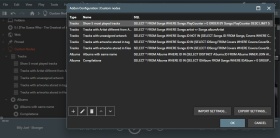
Hiermee kunt u aangepaste knooppunten binnen MediaMonkey maken. Er zijn 7 voorbeeldknooppunten meegeleverd, maar u kunt elke gewenste knooppuntstructuur creëren, mits u bekend bent met de databasestructuur van MediaMonkey.
Translated automatically (see original)Allows you to create custom nodes within MediaMonkey. 7 sample nodes are included, but you can create whatever nodes you want assuming you familiarize yourself with the MediaMonkey database structure.
Hide original
By
Ludek
Ingezonden door rusty
Bijgewerkt 30/12/2025
Versiegeschiedenis / Details
- Versie:
- 1.1.5
- Bijgewerkt:
- 30/12/2025
- Size:
- 6.36 KB
- Werkt met:
- Media Monkey 5
- Wijzigingen:
Version 1.1.5 adds a UI to save custom queries
Afhankelijk van uw bron kan een audioboek bestaan uit honderden bestanden van verschillende cd's.
Elke CD heeft zijn eigen tracknummers, wat betekent dat het mogelijk is dat u op het hele album meerdere tracks met dezelfde naam hebt.
Voor sommige audiospelers is het een nachtmerrie om de juiste volgorde aan te geven.
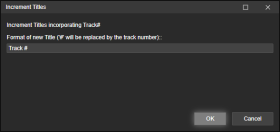
Track Entitler biedt u de mogelijkheid om de tracks automatisch een naam te geven op basis van het tracknummer.
Proces
- Zorg ervoor dat alle bestanden de spoornummers in de juiste volgorde hebben.
- Selecteer alle tracks waarvan u de titel wilt wijzigen.
- Klik met de rechtermuisknop op Tags bewerken (of gebruik Extra > Tags bewerken ) en selecteer Titels verhogen .
- Voeg de tekst toe die u aan uw nieuwe tracks wilt toevoegen.
Het teken # wordt vervangen door het tracknummer.
Voorbeelden
Spoor #
Spoor 1
Spoor 2
Spoor 3
...
Nieuwe Maan # van 102
Nieuwe Maan 1 van 102
Nieuwe Maan 2 van 102
Nieuwe Maan 3 van 102
...
Depending on your source - you may have hundreds of files in an audiobook from several CDs.
Each CD its own track numbers, which means you may end up with several identically named tracks in the entire album.
A nightmare for some audio players to gifure out the correct order.Track Entitler merely offers the possiblilty to automatically name the tracks based on the track number.
Process
- Make sure all files have Track Numbers in correct, sequential order.
- Select all tracks you want re-entitled.
- Right-click Edit Tags (or use the Tools > Edit Tags), and select Increment Titles.
- Add the text that you want your newly entitled tracks to have.
The character # will be replaced by the track number.Examples
Track #
Track 1
Track 2
Track 3
...
New Moon # of 102
New Moon 1 of 102
Hide original
New Moon 2 of 102
New Moon 3 of 102
...
By
ConcernedWife
Ingezonden door ConcernedWife
Bijgewerkt 08/10/2025
Versiegeschiedenis / Details
- Versie:
- 1.0.2
- Bijgewerkt:
- 08/10/2025
- Size:
- 2.41 KB
- Werkt met:
- Media Monkey 5 - 5
- Wijzigingen:
Initial version