Breid de beheermogelijkheden van MediaMonkey uit.

Hiermee kunt u de map vinden en weergeven die de track bevat die momenteel wordt afgespeeld binnen de geselecteerde tak van de Media Tree, automatisch wanneer het programma een andere track begint af te spelen. Nadat de map is gevonden, wordt de track die momenteel wordt afgespeeld geselecteerd in de hoofdtracklist.
Er is geen directe download, de add-on wordt na ontvangst van de donatie per e-mail verzonden. De gratis versie voor MM4 is beschikbaar om te downloaden op de website.
Translated automatically (see original)It allows finding and displaying of the folder that contains the currently playing track within the selected branch of the Media Tree automatically whenever the program starts to play another track. After the containing folder is located, the currently playing track will be selected in the main tracklist.
There is no direct download, the add-on will be send by e-mail after received donation. The free version for MM4 is available for download at its web site.
Hide original
By
Zvezdan Dimitrijević
Ingezonden door ZvezdanD
Bijgewerkt 20/06/2022
Versiegeschiedenis / Details
- Versie:
- 2.0
- Bijgewerkt:
- 20/06/2022
- Werkt met:
- Media Monkey 5
- Wijzigingen:
Added: version of the add-on for MediaMonkey v5.
Deze add-on markeert bestanden met een lage bitsnelheid in bestandslijsten.
Translated automatically (see original)This addon highlights low-bitrate files in file listings.
Hide original
By
Ventis Media, Inc
Ingezonden door drakinite
Bijgewerkt 08/12/2020
Versiegeschiedenis / Details
- Versie:
- 1.0
- Bijgewerkt:
- 08/12/2020
- Size:
- 1.25 KB
- Werkt met:
- Media Monkey 5.0.0 - 5.0.0
Toplijstmonitor
Top List Monitor zet je MediaMonkey 5-luistergeschiedenis om in dynamische, interactieve ranglijsten ( Topalbums , Topnummers en Topartiesten ) met gedetailleerde statistieken, zodat je je rankings efficiënt kunt analyseren en verbeteren.
Belangrijkste kenmerken en functionaliteiten
3 speciale ranglijstweergaven: Volgt de populairste items op basis van het totale aantal afspeelbeurten (albums/artiesten) of het aantal afspeelbeurten van individuele nummers (songs).
Slimme rangschikkingslogica: maakt gebruik van de standaard rangschikking van wedstrijden (1-2-2-4) met een eerlijke afhandeling van gelijke scores (items met een gelijke score worden nooit overgeslagen).
Meetwaarden voor motiverend luisteren:
Naar de volgende rang/mijlpaal: Toont het exacte aantal gespeelde wedstrijden dat nodig is om de volgende positie te bereiken, een veelvoud van 50, of de hoogste mijlpaal (Top 100, Top 50, enz.).
Efficiëntie en tijdsbesparing: berekent "aantal gewonnen plaatsen per afspeelbeurt" en "aantal gewonnen plaatsen per uur luistertijd".
Lead- en Hot Zone-indicatoren: Markeer kleine hiaten (gele "Hot Zone") en visualiseer leads ten opzichte van lagere rangen met kleurgecodeerde waarschuwingen (rood/geel/groen).
Verzadiging en gemiddelden: Geeft aan hoe geconcentreerd uw luistergewoonten zijn (bijv. % van het totale aantal afspeelmomenten in uw Top 10/100).
Krachtige filter- en navigatiefuncties:
Filter op genre , jaar van uitgave of afspeeljaar (analyseer bijvoorbeeld releases uit de jaren 90 die in een specifiek jaar zijn afgespeeld).
Klik op een item om direct naar dat album, nummer of artiest in je MediaMonkey-bibliotheek te gaan.
Exporteer afspeellijsten met één klik: Exporteer de $N$ populairste albums, nummers of tracks per artiest als statische afspeellijsten, gegroepeerd in een aparte map.
Volledig aanpasbaar: Stel per categorie de lengte van individuele lijsten, de minimale afspeeldrempel en de exportgrootte van afspeellijsten in.
Top List Monitor
Top List Monitor turns your MediaMonkey 5 listening history into dynamic, interactive ranking lists (Top Albums, Top Songs, and Top Artists) with detailed metrics to help you analyze and boost your rankings efficiently.
Key Features & Functionality
Hide original
3 Dedicated Ranking Views: Tracks top items by cumulative play counts (Albums/Artists) or single track plays (Songs).
Smart Ranking Logic: Uses standard competition ranking (1-2-2-4) with fair tie handling (tied items are never omitted).
Motivational Listening Metrics:
To Next Rank / Milestone: Shows exact play counts needed to reach the next position, multiple of 50, or top milestone (Top 100, Top 50, etc.).
Efficiency & Time-Efficiency: Calculates "rank places gained per play" and "places gained per hour of listening time".
Lead & Hot Zone Indicators: Highlights close gaps (yellow "Hot Zone") and visualizes leads over lower ranks with color-coded alerts (Red/Yellow/Green).
Saturation & Averages: Displays how concentrated your listening habits are (e.g., % of total plays in your Top 10/100).
Powerful Filtering & Navigation:
Filter by Genre, Release Year, or Play Year (e.g., analyze 1990s releases played in a specific year).
Click any entry to jump directly to that album, track, or artist in your MediaMonkey library.
1-Click Playlist Export: Export Top $N$ albums, songs, or top tracks per artist as static playlists grouped in a dedicated folder.
Fully Customizable: Set individual list lengths, minimum play thresholds, and playlist export sizes per category.
By
AI (Inspired by Fetznschaedl)
Ingezonden door fetzenschaedl
Bijgewerkt 06/10/2026
Versiegeschiedenis / Details
- Versie:
- 0.27.1
- Bijgewerkt:
- 06/10/2026
- Size:
- 287.61 KB
- Werkt met:
- Media Monkey 2024 - 2027
- Wijzigingen:
-
Better Light Skin Compatibility & Visual Polish:
-
Better support for light MediaMonkey themes, with automatically adapted background, text, and accent colors for optimal contrast.
-
Refined table presentation featuring dimmed zero/empty values, structured column groups, clear visual hierarchy, and integrated progress bars.
-
Custom-built dropdowns and theme-adaptive input controls replacing native browser selects.
-
-
Navigation & Filtering Enhancements:
-
Click-through navigation now opens tracks, albums, artists, and genres directly in your Entire Library rather than scoping to selected collections.
-
Top Genres now features full time-filtering support via Period (Plays), Year (Plays), and Year (Release) dropdowns.
-
A dedicated Reset button in all list windows restores default filters and reloads the view in a single click.
-
-
New Statistics & Metrics:
-
Added Median play count and Min to enter list thresholds to the top summary statistics bar across all views.
-
-
Performance & Usability:
-
Smooth background batch-rendering for large lists to minimize UI freezing during generation.
-
Refined keyboard behavior (e.g., pressing Escape dismisses open dropdowns first without closing the whole window).
-
- Flexible List Limits ("Limit Priority"): A new "Limits" dropdown across all lists gives you control over how thresholds are applied (Both limits, Fill to Max entries, or All ≥ Min plays). This prevents lists from becoming unexpectedly short when combining strict genre, period, or year filters with play counts.
-
- Versie:
- 0.9.2
- Bijgewerkt:
- 21/09/2026
- Size:
- 246.28 KB
- Werkt met:
- Media Monkey 2024 - 2024
- Wijzigingen:
New Features 0.9.2
-
HTML & Word Report Export (v0.9.0, v0.9.1)
-
Added a new Report (HTML / Word) feature across all four dialogs (Top Albums, Songs, Artists, Genres).
-
Generates print-ready reports respecting active filters and custom row limits ($1text{–}5000$).
-
Supports standalone HTML files for web browsers and Word .doc formats (styled with MediaMonkey-inspired formatting).
-
v0.9.1 updates: Improved Word/OpenOffice compatibility, landscape orientation support, dense multi-page layouts, and fixed-width rating columns to prevent clipping.
-
-
Expandable Artist Top Albums (v0.8.0, v0.8.1)
-
Added an arrow button in Top Artists allowing users to unfold an artist’s top albums directly in the list view without re-rendering or losing scroll position.
-
Displays album positions, play counts, total listening time, relative percentage share bars, and star ratings (filtered exclusively to the selected artist's track contributions).
-
Persistent selection stays expanded during sorts, searches, and refreshes.
-
-
Star Ratings for Albums & Songs (v0.7.0)
-
Introduced a Rating column for Top Albums and Top Songs, displaying ratings with 5-star half-precision (visualized using precise CSS gold/grey overlays).
-
Pulls native database ratings (Songs.Rating / Albums.Rating), supports sorting (unrated items placed last), and exports values into CSVs without impacting performance metrics.
-
Can be toggled on or off via Settings.
-
-
- Versie:
- 0.6
- Bijgewerkt:
- 17/09/2026
- Size:
- 216.27 KB
- Werkt met:
- Media Monkey 2024 - 2024
- Wijzigingen:
Features
-
Distinct Menu Icons (v0.6.0): Added unique toolbar icons for all menu entries (Top List Monitor, Top Albums, Top Songs, Top Artists, Top Genres) using built-in MediaMonkey 5 icons and a custom SVG (charts.svg).
-
Genre Filter "Contains" Mode (v0.5.9): Introduced a toggle chip (= Exact vs. ⊇ Contains) enabling substring search across genres, direct text filtering on Enter, active filter indicators in UI/filenames, and automatic filter re-application when toggling modes.
-
Performance Optimization for Top Songs & Artists (v0.5.6): Extended the RANK() window-function optimization to Top Songs and Top Artists, reducing queries from 2–3 full table scans down to a single query pass.
-
- Versie:
- 0.5
- Bijgewerkt:
- 02/09/2026
- Size:
- 188.46 KB
- Werkt met:
- Media Monkey 2024 - 2024
- Wijzigingen:
What’s New in v0.4.6 – v0.5.0
-
CSV Export (v0.5.0): Added an "Export as CSV" button to all lists (Albums, Songs, Artists, Genres). It exports whatever data is currently visible in the grid (respecting active filters/sorting) using UTF-8 with BOM for proper Excel compatibility.
-
"Rank by" Metric Switching (v0.4.7): You can now switch the ranking basis between Plays and Listening time for Albums, Songs, and Artists. Choosing "Listening time" recalculates all metrics (Rank, Rank gain, Hot Zone, Efficiency, etc.) based on estimated total listening time instead of pure play counts.
-
"Listening time" Column (v0.4.6): Introduced a dedicated column in Albums, Songs, and Artists lists showing estimated cumulative listening time ({plays} x {track length}).
-
- Versie:
- 0.4.5
- Bijgewerkt:
- 29/08/2026
- Size:
- 167.62 KB
- Werkt met:
- Media Monkey 2024 - 2024
- Wijzigingen:
? What's New in Version 0.4.5 ? Enhanced Rank Trend Analysis
-
Dynamic Period Support: Rank Trend now works dynamically with short-term Period filters (e.g., Last 7/30/90/180/365 days) by comparing current performance against the equivalent previous timeframe.
-
Year Trend Indicators: Track how entries move over time compared to their status at the start of the year, including gain/loss indicators, new entries, and a dedicated "Fell out of Top N" section.
-
Improved UI & Tooltips: Renamed to "Rank trend" with automatically updating headers, hints, and context tooltips.
⚙️ Unified Step Logic & Custom Thresholds
-
Flexible "Rank gain at +" Field: Replaced fixed dropdowns with a customizable input field (1–100) that defaults directly to your list’s Hot Zone threshold.
-
Consistent Calculations: Unified time efficiency (rank/h), rank gain, and efficiency metrics to share the exact same step size across all calculations.
?️ Bug Fixes & Performance
-
Promise Handling Fix: Fixed an issue where dialogs would get stuck on "Loading..." when trend data was fetched.
-
Accurate Filtering & Headers: Fixed bugs where minimum play requirements were bypassed for baseline rankings and where custom "Max entries" limits were ignored in tooltips.
-
- Versie:
- 0.3.1
- Bijgewerkt:
- 21/08/2026
- Size:
- 141.31 KB
- Werkt met:
- Media Monkey 2024 - 2024
- Wijzigingen:
v.01.1 - v0.3.1
-
New Top Genres List: Added to Tools → Top List Monitor → Top Genres, showing total plays, library share, and distinct counts for songs, artists, and albums per genre (with multi-genre track support). Configurable via Settings.
-
Performance & UI Fixes: Optimized Top Genres loading on large libraries via SQL pre-grouping, and added a visual gap between columns and scrollbars across all list windows.
-
Configurable Hot Zones & Rank Gain Expansion: Hot zone thresholds are now individually adjustable per list (defaulting to 2 for Songs, 10 for Albums/Artists). Expanded "Rank gain at" dropdown options up to +50, and added an explanatory hover tooltip to the Efficiency header.
-
Header & Footer Quick Controls: Added session-overriding header inputs for "Max entries" and "Min plays" with custom stepper controls, alongside an inline playlist entry count field in list footers for live updates.
-
Playlist & Filtering Improvements: Standardized playlist naming patterns to encode active filters, switched playlist export dates to ISO 8601 format ([YYYY-MM-DD]), and introduced a "Period (Plays)" filter (7 to 365 days / All time).
-
System & Code Maintenance: Added optional keyboard hotkeys for main lists, expanded the Settings dialog layout, and consolidated shared dialog helper logic internally.
-
- Versie:
- 0.1
- Bijgewerkt:
- 18/08/2026
- Size:
- 106.62 KB
- Werkt met:
- Media Monkey 2024 - 2024
Afhankelijk van uw bron kan een audioboek bestaan uit honderden bestanden van verschillende cd's.
Elke CD heeft zijn eigen tracknummers, wat betekent dat het mogelijk is dat u op het hele album meerdere tracks met dezelfde naam hebt.
Voor sommige audiospelers is het een nachtmerrie om de juiste volgorde aan te geven.
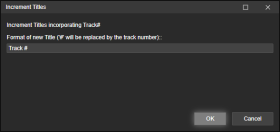
Track Entitler biedt u de mogelijkheid om de tracks automatisch een naam te geven op basis van het tracknummer.
Proces
- Zorg ervoor dat alle bestanden de spoornummers in de juiste volgorde hebben.
- Selecteer alle tracks waarvan u de titel wilt wijzigen.
- Klik met de rechtermuisknop op Tags bewerken (of gebruik Extra > Tags bewerken ) en selecteer Titels verhogen .
- Voeg de tekst toe die u aan uw nieuwe tracks wilt toevoegen.
Het teken # wordt vervangen door het tracknummer.
Voorbeelden
Spoor #
Spoor 1
Spoor 2
Spoor 3
...
Nieuwe Maan # van 102
Nieuwe Maan 1 van 102
Nieuwe Maan 2 van 102
Nieuwe Maan 3 van 102
...
Depending on your source - you may have hundreds of files in an audiobook from several CDs.
Each CD its own track numbers, which means you may end up with several identically named tracks in the entire album.
A nightmare for some audio players to gifure out the correct order.Track Entitler merely offers the possiblilty to automatically name the tracks based on the track number.
Process
- Make sure all files have Track Numbers in correct, sequential order.
- Select all tracks you want re-entitled.
- Right-click Edit Tags (or use the Tools > Edit Tags), and select Increment Titles.
- Add the text that you want your newly entitled tracks to have.
The character # will be replaced by the track number.Examples
Track #
Track 1
Track 2
Track 3
...
New Moon # of 102
New Moon 1 of 102
Hide original
New Moon 2 of 102
New Moon 3 of 102
...
By
ConcernedWife
Ingezonden door ConcernedWife
Bijgewerkt 08/10/2025
Versiegeschiedenis / Details
- Versie:
- 1.0.2
- Bijgewerkt:
- 08/10/2025
- Size:
- 2.41 KB
- Werkt met:
- Media Monkey 5 - 5
- Wijzigingen:
Initial version